Get every detail locked
before doors open.
From your first event page to a fully configured programme, Eventira gives your team the structure to move fast, stay organised, and stop rebuilding from scratch.
- ✓ Event page published
- ✓ Registration live, 3 ticket types
- ✓ Multi-track schedule configured
- ✓ Speakers & sponsors onboarded
- – Final attendee comms scheduled
Done-for-you setup and full support, complimentary on every plan for clients signing up during 2026.
Limited-time offer
Event Website
Build your event website and navigation. No code required.
Build the event page.
No developer. No wait.
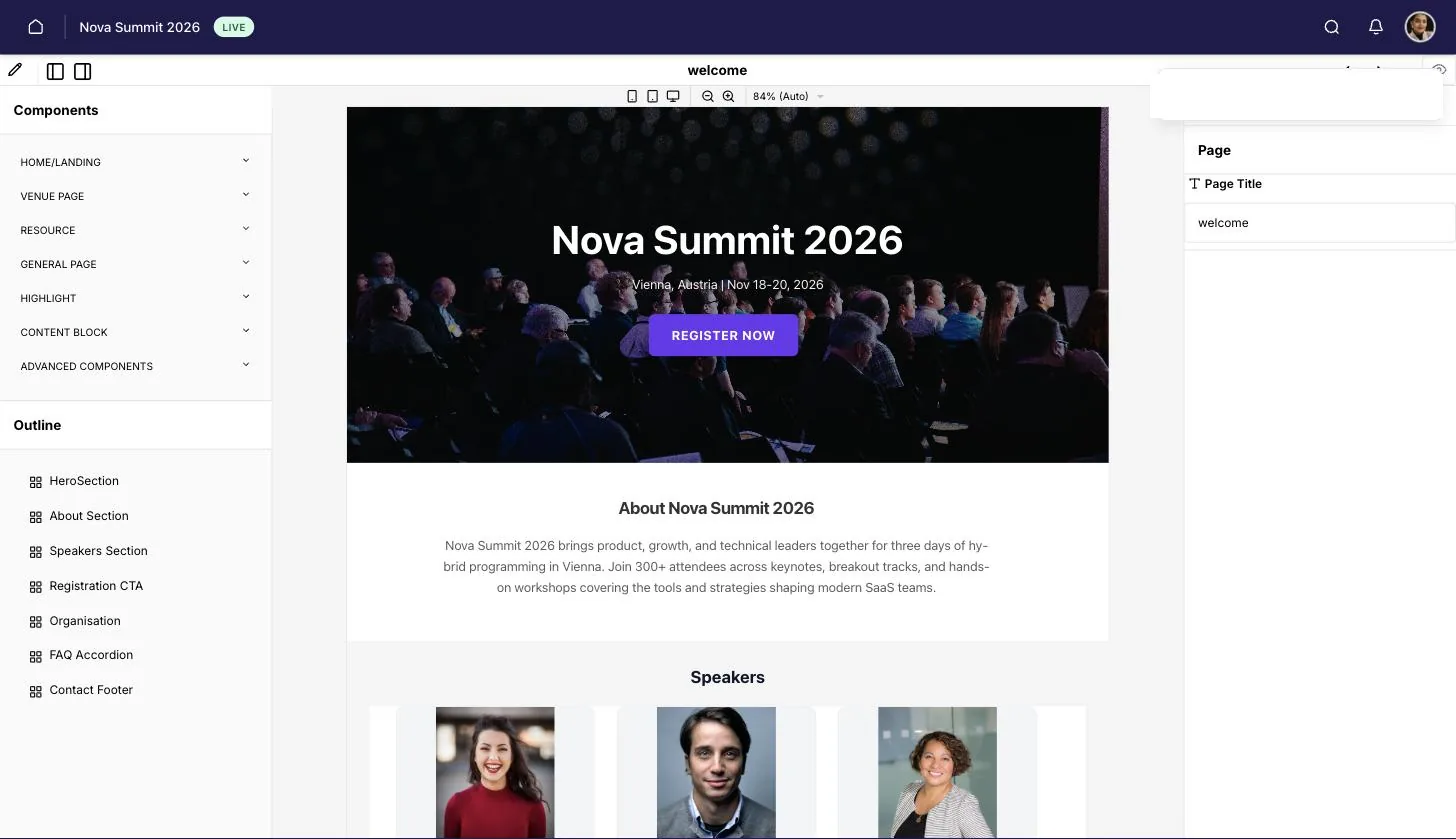
A working sample of the page builder. Open a group, click a component to drop it on the page, and select a block to see its settings — the same palette, grouped the same way, as the real editor.
Planning is supposed to reduce chaos.
Most tools add to it.
When your registration tool, event page builder, and schedule manager are three different products, the coordination overhead becomes its own full-time job.
You rebuild everything from scratch every time.
No templates. No carry-over. Event 8 takes as long as event 1, and the deadline is always tighter than the last one.
Changes in one tool never reach the others.
A schedule update in Notion doesn't update the event app. A speaker change in your spreadsheet doesn't notify attendees. You're manually syncing five systems before every event.
Your team can't work in the same place at the same time.
Marketing is in Eventbrite, ops is in a spreadsheet, the CEO is asking for a status update, and nobody has the same version of the truth.
Two things your team notices immediately.
Faster Event Setup
Quickly build professional event websites and attendee apps using easy-to-build pages and custom forms. Template once, reuse forever. Event 8 takes as long as event 2, and your team has done this before, so it usually takes less time than that.
Zero Learning Curve
Manage complex events with an intuitive interface. Set up, launch, and manage without needing technical training or lengthy tutorials. New team members are running events within days, not weeks, since nothing here requires technical training to pick up.
Professional event pages.
No developer needed.
Build branded event websites and attendee apps directly from your browser. Drag-and-drop blocks, custom forms, your logo and colours. It's live in minutes, not days, and every page you build becomes a template for the next event.
- ✓ Drag-and-drop no-code builder that any team member can use
- ✓ Custom branding: logo, colours, fonts, layouts
- ✓ Mobile-optimised by default, web and app stay in sync
- ✓ Save as template, so event 8 starts where event 7 left off
- ✓ Custom domain support on Premium plan
Complex programmes.
One clear view.
Plan events with multiple tracks, parallel sessions, and sub-session breakouts, all in one scheduler. Tracks are built from tags that label a session, locations that keep simultaneous ones apart, and separate programmes for a strand that is really its own event. You publish the full programme; attendees build their own personalised agenda from it. Changes update everywhere automatically.
- ✓ Parallel sessions across rooms and programmes, with a consolidated view of the whole event
- ✓ Parent-child session hierarchy: plenary sessions with their own sub-sessions and breakouts
- ✓ Session templates for common formats: plenaries, poster sessions, workshops
- ✓ Attendees build a personalised agenda from the published schedule
- ✓ CMS changes sync instantly, so attendees see updates on refresh
Registration live
in minutes, not days.
Custom registration forms and capacity limits, configurable without IT. Connect Ticket Tailor for paid tickets, tiered pricing, and discount codes. Bulk upload attendees, speakers, and sponsors via template. The first event takes an hour; the tenth takes twenty minutes.
- ✓ Custom text fields for registration forms
- ✓ Capacity limits and automated confirmations
- ✓ Bulk upload via template for attendees, speakers, sponsors
- ✓ Paid ticketing, tiered pricing, and discount codes (coming soon)
Every event. Every team.
One dashboard.
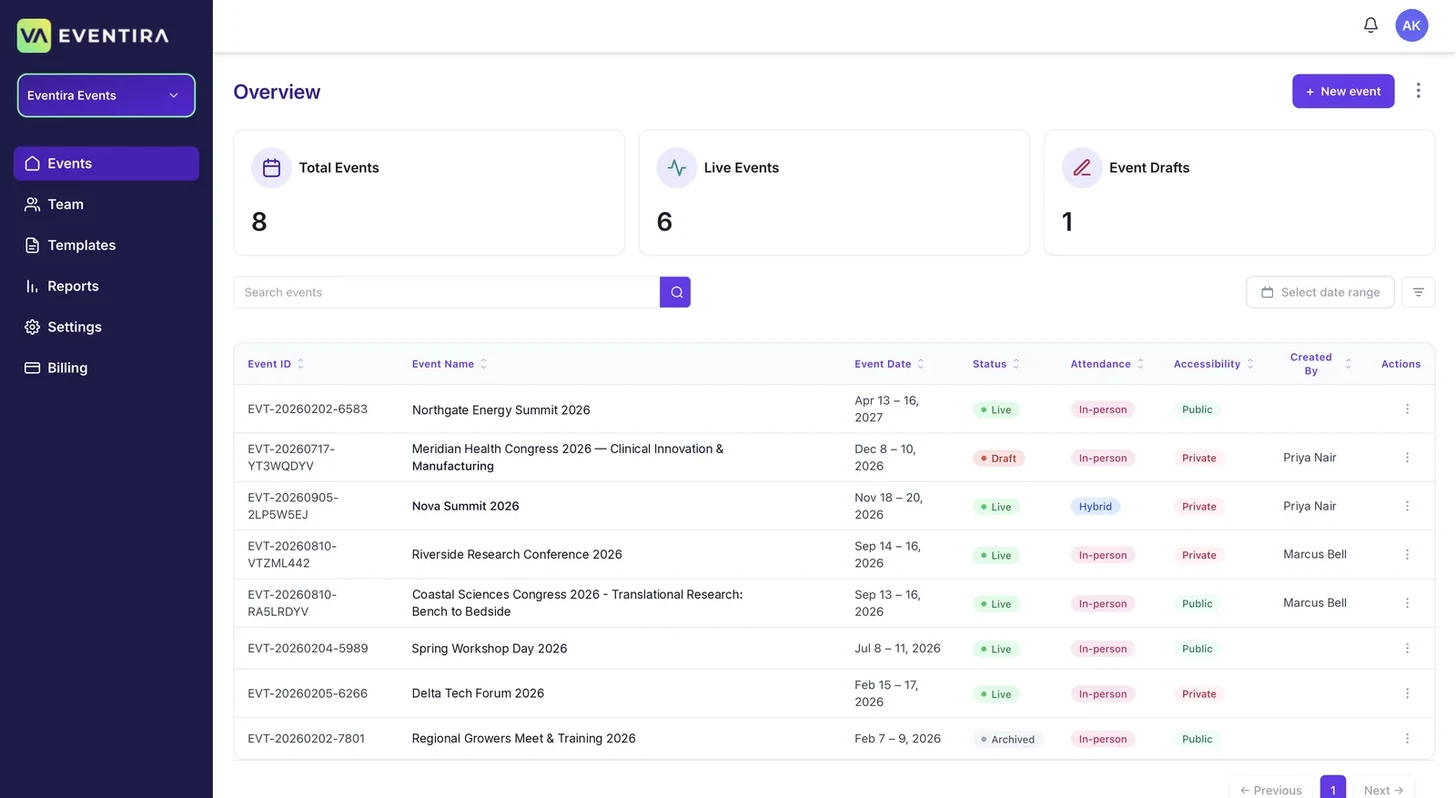
Managing more than one event, or more than one client? The multi-event RBAC dashboard gives different team members the right access to the right events. Managers see everything. Clients see only their events. Nothing leaks across accounts.
- ✓ Unified dashboard across all events and clients
- ✓ Three role tiers: Organizer, Team manager, Event admin
- ✓ Organizers control account deletion and full team access
- ✓ Team managers assign events, but can't delete accounts
- ✓ Event admins work their events only, nothing bleeds across
- ✓ Ideal for agencies managing multiple clients simultaneously
Attendees arrive ready.
No friction, no confusion.
The attendee experience starts the moment someone registers, not the morning of the event. Branded confirmation emails, prompts to set up a personalised agenda, app download links, and pre-event communications all flow automatically from the moment registration closes.
- ✓ App download and profile setup emails sent in advance
- ✓ Automated branded confirmation and reminder emails
- ✓ Notification with instructions for personalised agenda setup sent
- ✓ Bulk pre-event communications via email and in-app
- ✓ Zero manual follow-up needed, though manual send is available anytime
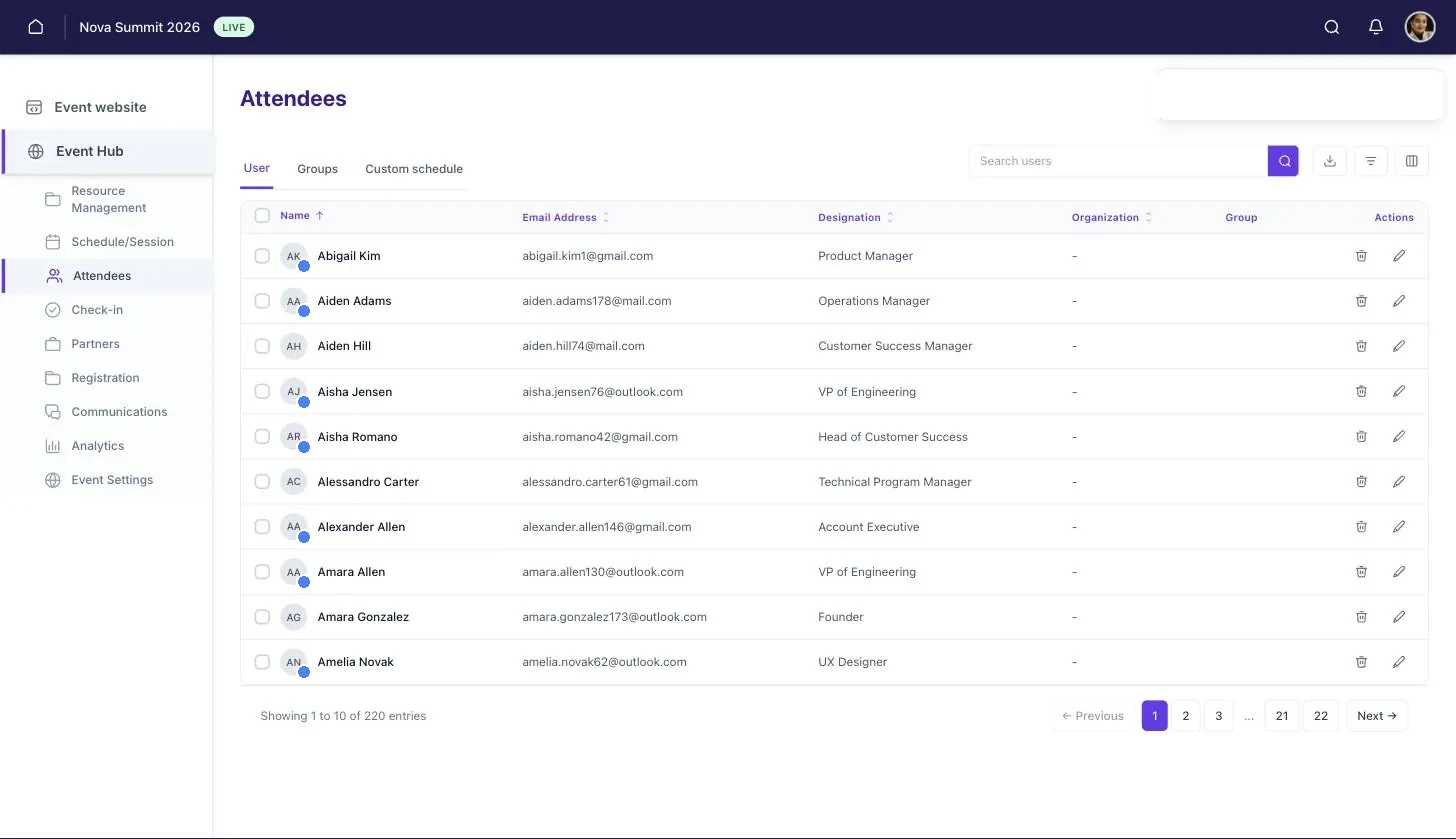
- ✓ See at a glance who has signed in, so you know who still needs a nudge
Looks like yours.
Works like a product.
From your brand colours on every attendee page to a fully white-labelled app under your domain, Eventira deploys the way your organisation needs it.
Brand Theming
Apply your logo, brand colours, and typography across all attendee-facing pages, emails, and the mobile app. Every touchpoint is on-brand.
All plansCustom Domain
Host your event pages on your own domain (events.yourcompany.com) instead of an Eventira subdomain. Attendees never see the difference.
Premium planWhite Label
Full white-label: remove all Eventira branding from the attendee app and event website. Your brand only, ideal for agencies and enterprise.
Premium planTemplate Library
Save any event as a template. Your team starts from a working event, not a blank canvas, every single time.
Pro & PremiumIntegrations
Keep your existing tools. Eventira integrates with Ticket Tailor, Cvent, Salesforce, and HubSpot, so there's no rip-and-replace required.
All plansTwo-Factor Authentication
Two-factor authentication and role-based access for your team, on top of standard account security.
Pro & PremiumBuilt for teams running
10+ events a year.
Not just one event: your entire programme. The operational tools that make running a portfolio of events manageable for one person or a full team.
Multi-Event Dashboard
All your events in one view: status, registrations, upcoming deadlines, and team assignments.
Team Permissions & Roles
Assign roles per event or across the whole account. New team members get access to exactly what they need, nothing more.
Approval Workflows & QA Gate
Route stakeholder sign-offs through built-in approval flows. A "Preview & Check" quality gate lets organisers review all content in the exact attendee view before anything goes live, catching errors before they reach attendees.
Resource Management
Venues, AV, catering, staff, and suppliers, all tracked against each event, so the logistics spreadsheet finally goes away.
Stakeholder ManagementComing soon
Dedicated logins and views for sponsors, speakers, and internal stakeholders are on the roadmap. Today, updates and comms run through the same bulk email and dashboard tools your team already uses.
Abstract ManagementComing soon
Call for abstracts, submission, peer review and acceptance, with accepted abstracts flowing straight into the programme. Today, abstracts are collected outside Eventira and brought in with the bulk agenda import.
Symposia ManagementComing soon
Satellite symposia and side events run as their own programmes with their own chairs, rooms and invited audiences, rolled up into one at-a-glance view across the whole event. Today, each symposium is set up as a separate programme.
Event Templates
Save any event configuration as a reusable template. Your best event setup becomes the starting point for every event that follows.
See your next event
set up in 30 minutes.
Book a demo and we'll walk through your upcoming event together: pages, schedule, registration, and all.